
We’re happy to announce an important update to the Examin8.com Test Generator. We have fixed two major issues related to tables in question papers, making it easier for teachers to create, download, and edit professionally formatted question papers.
These improvements will be particularly useful for Accountancy teachers and others who frequently use lengthy tables in their question papers.
What were the problems?
The main issues were related to tables in both two-column PDF and Word files. Large tables were extending beyond the page boundaries in PDFs, while in Word files, tables were being converted into images, making them difficult to edit.
(1) Text Overlap in PDF
As you can see in the screenshot below, the text is overlaid and going out of the table cell. This was due to the large table size, which didn’t fit within the two-column PDF format.
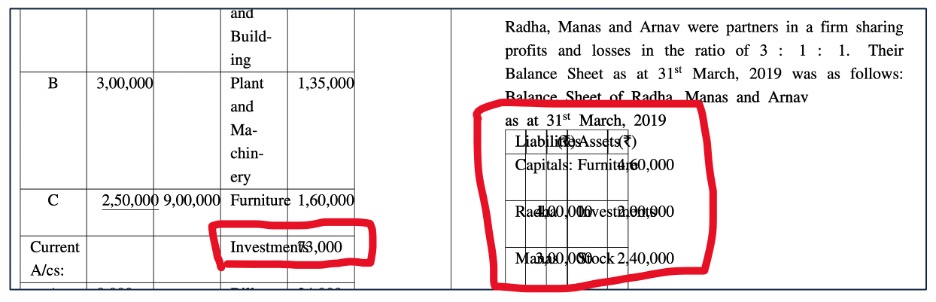
(2) Table Text Overflowing Page Boundaries
In some cases, text in large tables with too many columns was extending beyond the page boundaries, resulting in incomplete data in the printed PDFs.
(3) Unwanted Space Between Two Questions
When a large table appeared on one side of a two-column PDF, unwanted gaps often appeared between questions in the other column. Since the file was in PDF format, teachers couldn’t edit the layout or remove the extra space.
(4) Tables as Non-editable Images in Word file
We understand that teachers download question papers in MS Word format mainly because they want to edit and customise them. However, these tables were being converted into non-editable images, making it impossible to modify their content directly. As a result, teachers had to recreate the entire table from scratch just to make a few changes.
The Solution
Watch the video below to see how these issues have been fixed and learn how to edit tables and remove table borders in Word files downloaded from Examin8 Test Generator.
Large Tables Now Display Correctly in Two-Column PDFs
Earlier, teachers sometimes faced issues with large tables in two-column PDF question papers. Tables could overlap with other content, go beyond the page margins, or appear out of alignment. This affected the overall look of the question paper and made it difficult to read. Teachers often had to change the format or adjust the layout to fix these problems.
With this update, tables are now properly aligned in the two-column PDF format.
You can create question papers containing large tables with improved formatting and a cleaner layout. This makes the PDF easier to read and more convenient to print and distribute to students.
The improvement is especially helpful for Accountancy question papers, where questions often include detailed financial statements, balance sheets, comparative statements, and other extensive tabular data.
Tables in Word Files Are Now Editable
Another important issue was with Word files downloaded from Examin8 Test Generator.
Earlier, some tables in Word files were converted into images instead of editable tables. Teachers could see the content but couldn’t edit individual cells, change figures, adjust columns, or modify the table structure. They had to recreate the entire table to make changes, which wasted time and effort.
Now, tables in Word files are fully editable. Teachers can easily change the content, update figures, add or remove rows and columns, and customise their question papers in Microsoft Word or other compatible applications.
This update is especially helpful for Accountancy teachers who frequently work with large financial tables and statements.
More Flexibility for Teachers
These improvements are part of our ongoing effort to make Examin8 Test Generator more useful for teachers.
A question paper should not only contain the right questions but also have a clean layout and be easy to customise. By improving table formatting in PDFs and preserving editability in Word files, we aim to reduce the additional work teachers may need to do after generating a paper.
You can now benefit from better-formatted two-column PDFs and more flexible Word documents when working with tables.
Create Question Papers Faster with Examin8
Examin8.com Test Generator helps teachers create question papers, worksheets, and online tests using an extensive question bank. You can download question papers in PDF and Word formats and customise them to suit your examination requirements.
If you regularly prepare question papers containing large tables, try the updated version and experience the improvements yourself.
Visit Examin8.com Test Generator to create your next question paper in minutes.